Signals remain auditable
Every confirmed marker still prints. If the HMM permits entry, the order carries the signal name; if it blocks entry, the setup remains on the chart for review.
Imprint_ES, Imprint_NQ, and Imprint_UB execute confirmed Imprint signals only when the causal HMM permits that side. Every signal remains visible, the selectable background shows the HMM decision, and every filled trade moves through a defined protection sequence.
The package also unlocks ImprintFlowSignals. It does not include the separate full Imprint Flow footprint-bars display.
✓ ES, NQ, and UB specific · causal HMM gate · protected retail build · operating manual included
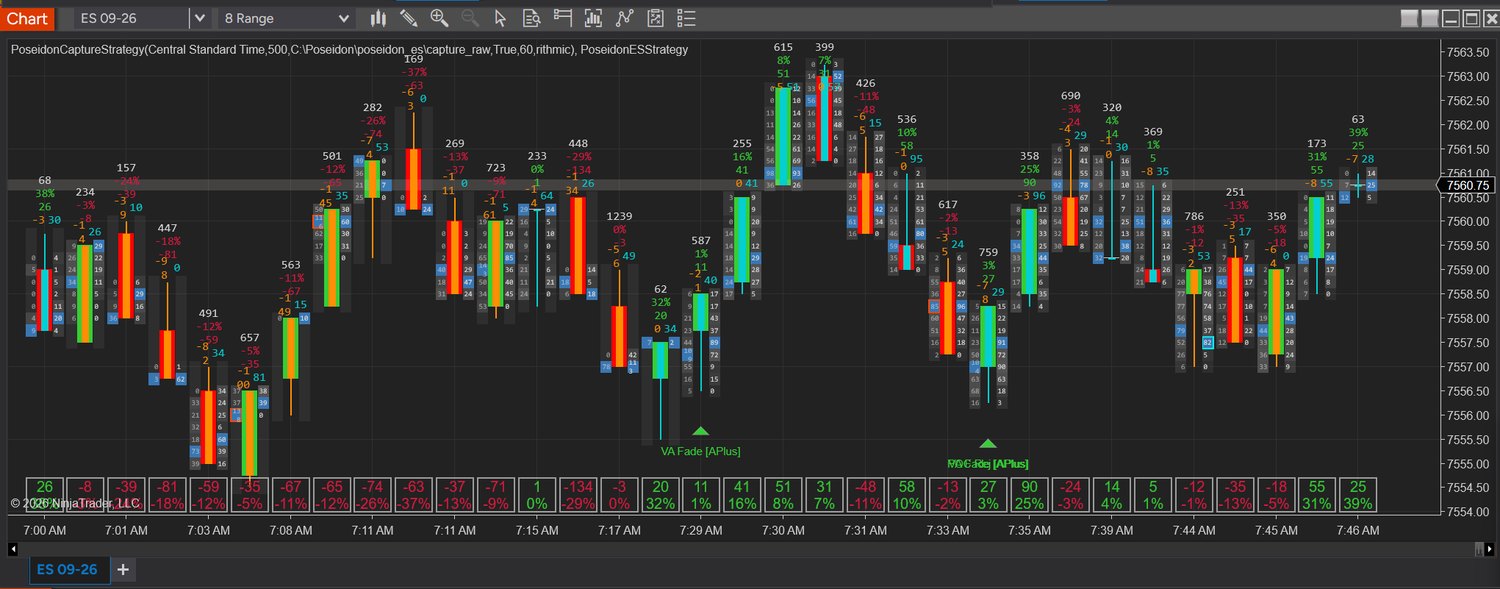
Chart image shown on top of the Imprint Flow footprint for context. The Strategy bundle itself installs the strategy plus the signal layer, not the full footprint-bars product.
ImprintFlowSignals identifies and plots the setup. A causal three-state HMM then decides whether a long, a short, both sides, or neither side is permitted. A blocked trade never hides the original marker.
Every confirmed marker still prints. If the HMM permits entry, the order carries the signal name; if it blocks entry, the setup remains on the chart for review.
A strong positive Trend permits longs only. A strong negative Trend permits shorts only. Balance permits both directions. Transition, uncertainty, invalid data, and directionless Trend permit neither.
The account, quantity, HMM state, session limits, and order permission remain visible and configurable before the strategy is enabled.
Imprint_ES, Imprint_NQ, Imprint_UB, and ImprintFlowSignals. One Flow Strategy key unlocks the strategy package and signal layer.
Signal labels remain on regular candles or range bars. Apply each strategy only to its matching master instrument; the wrong instrument fails closed. Imprint_NQ is tuned for a 31-range NQ chart.
It does not replace the chart with the full Imprint Flow footprint-bars display. That full bid/ask view is part of Imprint Flow and Flow Pro.
Open 00-OPERATING-MANUAL.txt, then import the downloaded ZIP without unzipping it. Add ImprintFlowSignals with License Key blank to obtain the Machine ID; if it is not shown on-chart, open Control Center → New → NinjaScript Output and remove/re-add it once. Activate that exact ID at imprint.ltd/activate, enable Tick Replay, set Days to load to 3, then apply Imprint_ES to ES, Imprint_NQ to a 31-range NQ chart, or Imprint_UB to UB.
Trade only the conviction you want: Watch, Standard, or A+ tier signals.
On an eligible confirmed signal, the strategy submits a four-tick marketable-limit collar and cancels it after 15 seconds if unfilled. The collar caps price; it does not intentionally pay four ticks of slippage.
ES and UB default to a 7-tick target and 7-tick stop. NQ defaults to a 20-tick target and 40-tick stop. An optional ATR bracket remains available.
ES and UB lock +2 at +4, then trail three ticks behind. At +10 ticks, NQ locks +4. At +14 ticks, NQ trails six ticks behind the best executable price.
The selectable overlay defaults to 20% opacity. Green is long-only, red short-only, blue balance/chop with either side eligible, amber blocked transition or low confidence, and gray warmup or invalid model data.
Signal cooldowns default to five bars on ES, eight bars on NQ, and three bars on slower UB. Every variant rejects a chart whose master instrument does not match.
One-position-at-a-time, trade cap, daily loss limit, session-close flattening, and a Chart Trader mini HUD showing the configured daily P/L target beside actual account P/L.
Requires Tick Replay on the data series for historical reconstruction. Strategy settings remain configurable; confirm the intended instrument, account, quantity, bracket, HMM state, and session controls before enabling.
one-time · lifetime license · bundles the signal indicator
Instant download + setup email. The ZIP includes 00-OPERATING-MANUAL.txt. Activate at imprint.ltd/activate and your key is issued in seconds.
$399 Strategy + add the $29.99 Candle for $20
Both products arrive immediately, with the correct operating manual inside every delivered archive.
Select Flow Strategy at $399 or add Imprint Candle for $20 in the $419 paired system. International cards are accepted through secure Stripe checkout and the receipt is immediate.
Your download starts immediately after payment, with a backup link and setup steps by email. Activate at imprint.ltd/activate and your key is issued in seconds.
Read the operating manual, import into NinjaTrader 8, enable Tick Replay, then add ImprintFlowSignals for markers, Imprint_ES on ES, Imprint_NQ on a 31-range NQ chart, or Imprint_UB on UB. Confirm the account and controls, then enable the matching strategy.
One Clean Trade, Ten Accounts shows how Imprint Candle, Flow Strategy, and Centurion fit together, including setup roles, safeguards, and scenario arithmetic.
Get the free playbookQuestions before checkout? Review the workflow above or email hello@imprint.ltd. Purchase terms are available in the refund policy.