↗
Continuation has a threshold
A directional bar is not closed because a timer expired. It continues until price completes the configured Drive or reverses enough to change structure.
Imprint Candle lets the move decide when a bar is finished. Separate Drive and Reversal thresholds expose continuation, failed continuation, and structural turns without tying every decision to elapsed time.
✓ One-time purchase · instant download · protected build · operating manual included
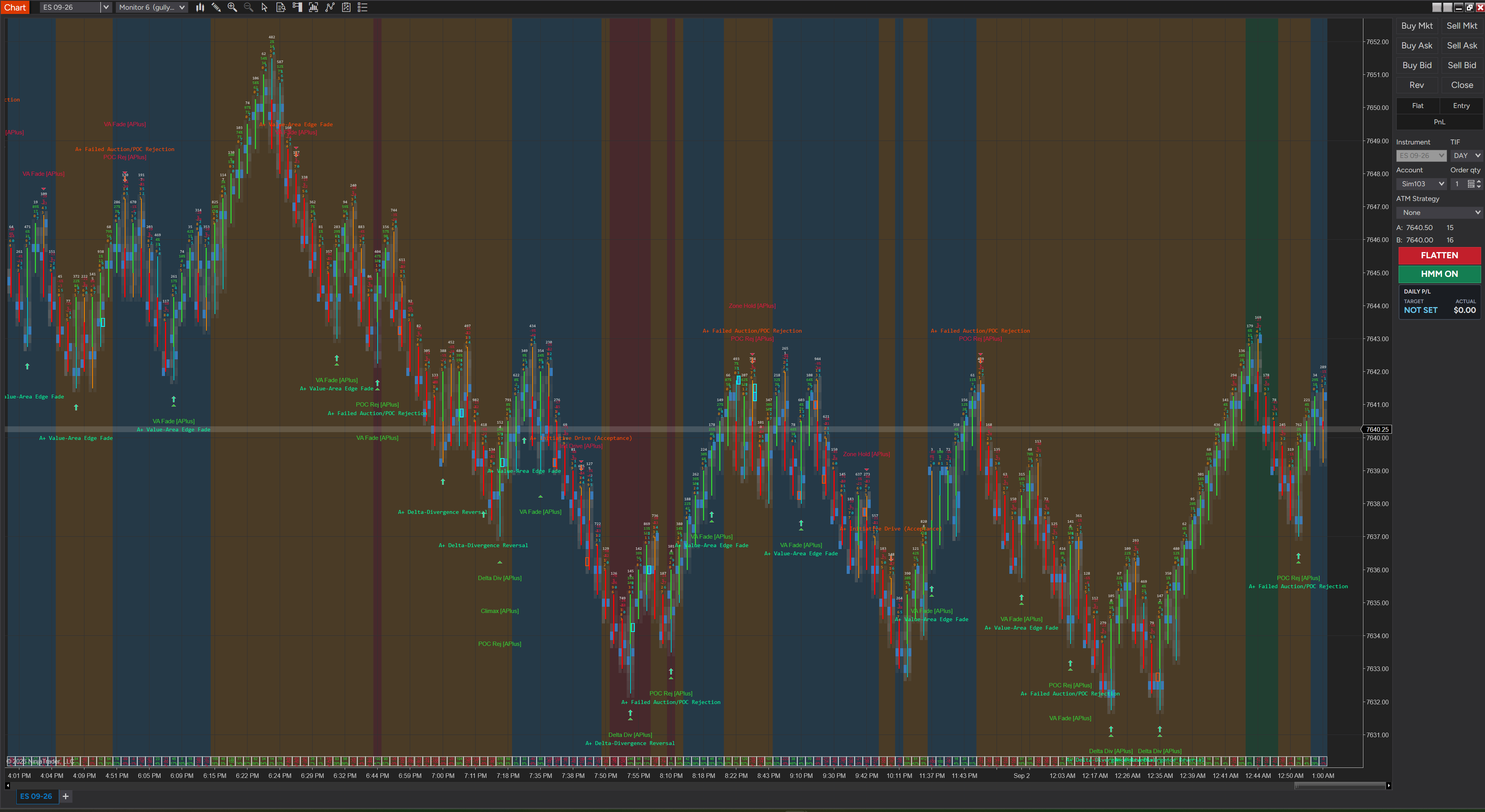
Actual NinjaTrader 8 chart showing the price-driven candle structure. Applied indicators and chart-template styling are shown for context and are separate from the Imprint Candle BarsType.
Time bars give every minute equal weight. Imprint Candle gives directional movement the weight. A bar establishes or continues after the configured Drive, while a counter-move from the active extreme uses the independent Reversal threshold.
A directional bar is not closed because a timer expired. It continues until price completes the configured Drive or reverses enough to change structure.
The counter-move is measured from the highest or lowest traded tick of the active sequence, not from an arbitrary clock boundary.
The same ordered tick sequence and session template produce the same bars. Session boundaries reset the active construction state cleanly.
These are chart-construction starting points, not stop, target, or performance settings. They are deliberately different because ES and NQ do not move the same way.
A tighter construction for ES movement and rotation.
A wider construction for NQ velocity and noise.
Imprint Candle controls how the chart is constructed. Flow Signals Strategy controls signal detection, HMM permission, entries, and trade management. Neither product pretends to do the other product’s job.
That separation is exactly why the pairing works: clearer price structure beneath a transparent, instrument-specific execution layer.
$399 Strategy + add the $29.99 Candle for $20.
Both offers are one-time purchases with instant protected delivery, activation instructions, and an operating manual.
Every delivery includes 00-OPERATING-MANUAL.txt. The download page and receipt email both direct you to it before installation, and every component inside the paired bundle carries its own manual.
Open the download and read 00-OPERATING-MANUAL.txt. In NinjaTrader 8, choose Tools → Import → NinjaScript Add-On, select the original ImprintCandle ZIP, then restart NinjaTrader.
Add Imprint Candle License to a standard chart with License Key blank. Copy its exact 8-character Machine ID. If it is not shown on-chart, open Control Center → New → NinjaScript Output, then remove and re-add the indicator once. Activate at imprint.ltd/activate with your purchase email, paste the issued key, and reload the chart.
Open Data Series, select Imprint Candle, choose the intended contract and trading-hours template, then start with 6 / 10 on ES or 31 / 40 on NQ.
If the issue remains after setup, email hello@imprint.ltd with a Help → About screenshot, a fresh Control Center → Log screenshot after restart and one reproduction, and a chart screenshot with Data Series or Indicators open.
We will send the ES and NQ starting values, setup link, and product boundaries in one short reference email.
Questions before checkout? Review the operating setup above or email hello@imprint.ltd. Purchase terms are available in the refund policy.